GuidesSell and get paid
Add your payout account
The bank account your share of every payment goes to.
3 min read · Updated 8 November 2026
Buyers pay through our payment partner. On every payment, your share is sent to your own bank account on the partner’s schedule. You need a verified payout account before your store can take paid orders.
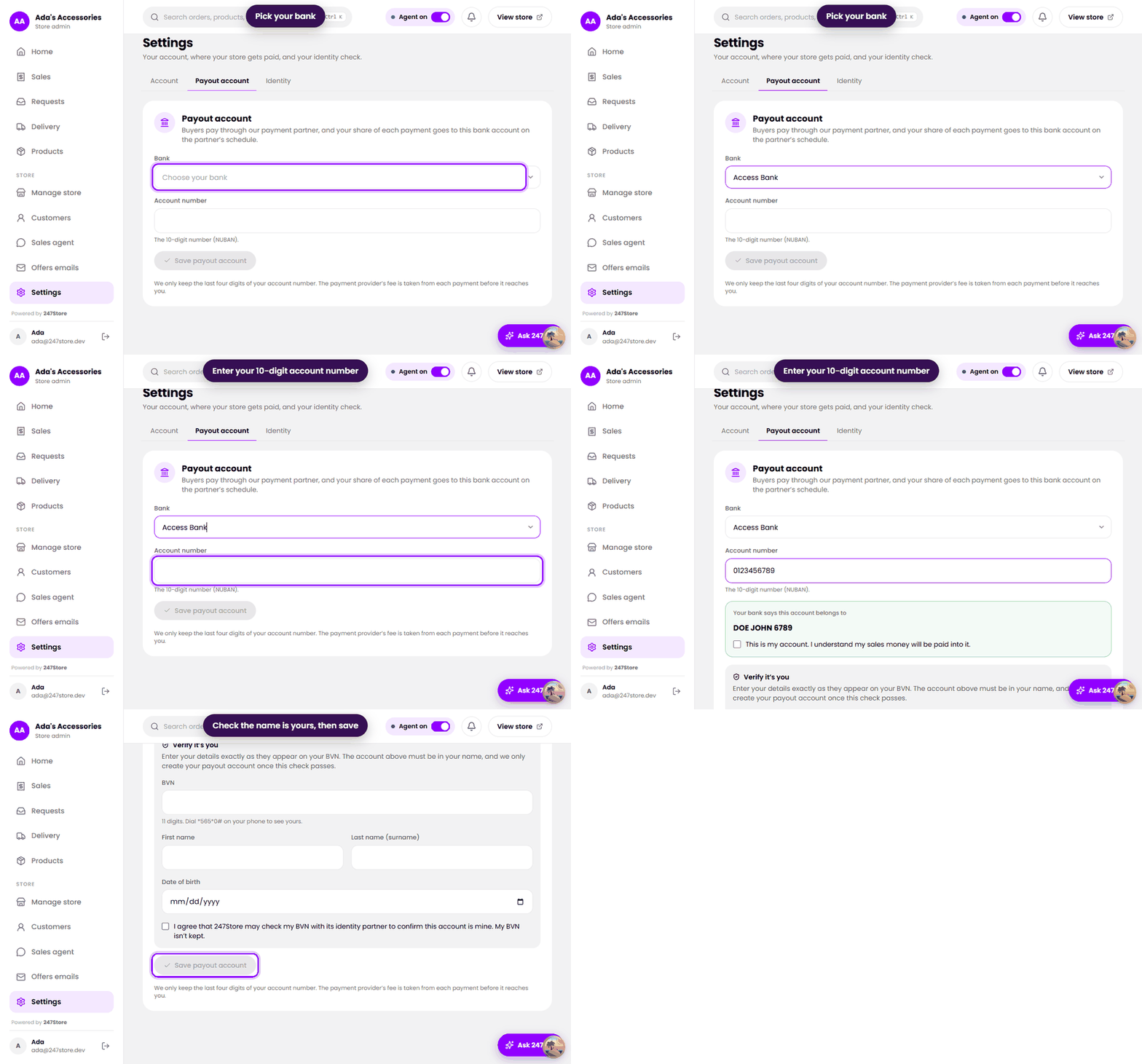
Add it
- Open Settings in the left menu and choose the Payout account tab.
- Pick your Bank.
- Enter your Account number, the 10-digit number (NUBAN). We look up the account name at your bank and show it to you.
- Check that the name is yours and tick This is my account.
- The first time, you are also asked for your BVN, your name and your date of birth, and to agree to the identity check. See Verify your identity.
- Press Save payout account.
What to know
- We only keep the last four digits of your account number.
- The payment provider’s fee is taken from each payment before it reaches you, and 247Store’s commission is taken from the same payment. The Payments tab on Sales shows how much was taken off each one. See Orders and money.
- Money reaches your bank on the payment partner’s own schedule, not ours.
- To change the account, open the same tab and save a new one. For your safety we ask for a 6-digit code we send you first.
Read next
Still stuck? Write to support.