GuidesGrow
Use your own domain
Serve your store at an address like shop.yourbrand.com.
4 min read · Updated 8 November 2026
Every store starts on a free address such as yourstore.247store.site. On the Pro plan you can serve your store on your own domain. Buyers see your brand in the address bar, and your old address redirects to the new one.
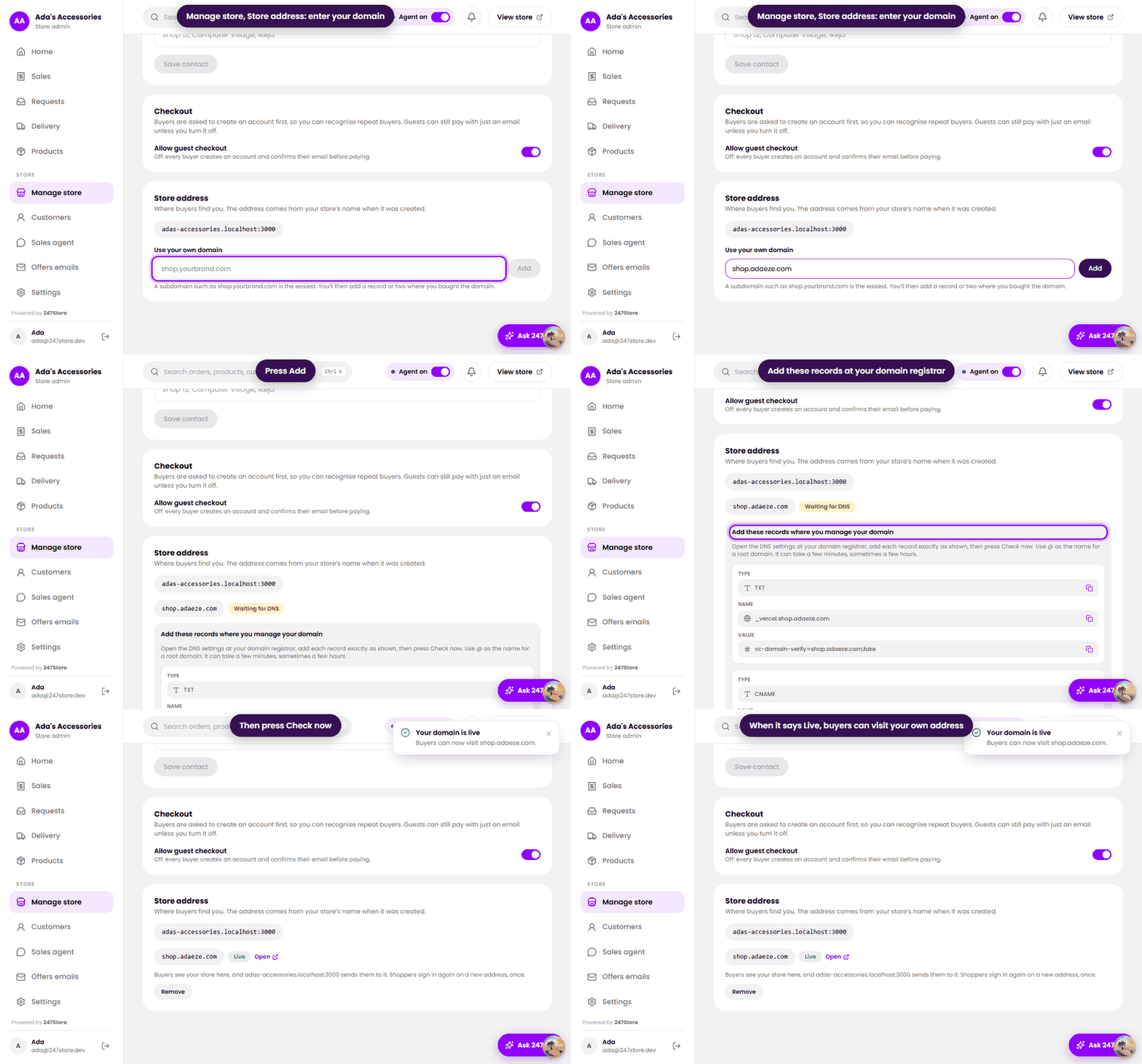
Add your domain
- Open Manage store and find Store address.
- Under Use your own domain, enter the address, for example
shop.yourbrand.com, and press Add. - We show the DNS records to add. Each has a type, a name and a value, with a copy button.
- Open the DNS settings where you bought your domain, and add each record exactly as shown. Use
@as the name for a root domain. - Press Check now. When the records are found, the status changes to Live.
Good to know
- One domain per store. To change it, Remove it and add the new one.
- Shoppers sign in again once on a new address, because it is a new place for their browser.
- Removing a domain returns your store to its
247store.siteaddress. Links people saved to the old one stop working. - Your dashboard login stays on 247store.site.
Read next
Still stuck? Write to support.